Thursday, 3 May 2012

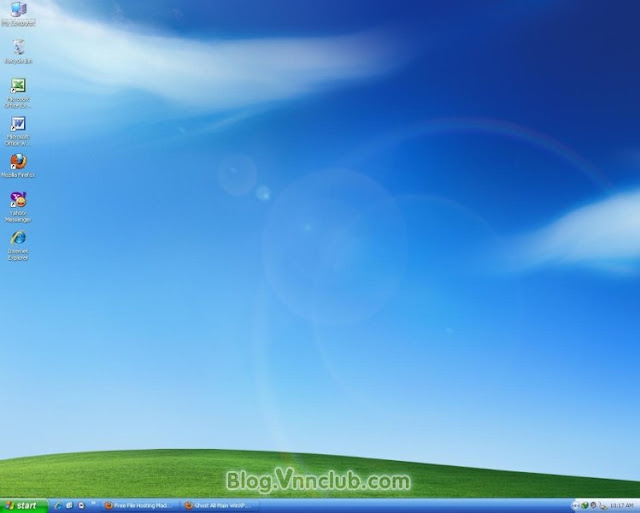
[MF] Bản Ghost Windows XP Sp3 Ver4


Bản Ghost Windows XP Sp3 Ver4 all Main


[MF] Bản Ghost Windows XP Sp3 Ver4
Ghost Windows XP Sp3

* Bản ghost: Windows Xp Sevice Pack 3 x86 (32 bit) from MSDN
* Hỗ trợ SATA: Yes.
* Hỗ trợ RAID: Yes.
* Hỗ trợ SCSI: Yes.
* Tự nhận drivers: Yes (Easy_DriverPacks_5.2.3.2)
* SPAT6.0.9.9[Beta 3] đã hỗ trợ AHCI 10.1.0.1008 Hỗ trợ tốt trên các thiết bị máy tính sử dụng Sata Intel AHCI 10.1.0.1008 ( mới nhất).
* Update trực tuyến:OK.
* CD Key:Ok
* File download: Ghost
* Số phần được cắt: 08 phần bằng chương trình Winrar

Software Install:
Font Full
K-Lite_Codec_Pack_840_Mega
Adobe Flash Player 11.1.102.63 x32 [ Firefox, Opera,IE ] : hỗ trợ duyệt web.
FoxitReader 514.0104: Đọc file PDF .
IDM 6.10 buld2 Full Edit by TieuWi: Hỗ trợ download
DotNet FramWork 2.0
Directx_feb2010_redist
Microsoft Office 2003 SP3 Full: Word, Excel, PowerPoint, Access tích hợp các add-in chuẩn cho văn phòng như chuyển đổi fon chữ, đọc số, thống kê emis.xla...
Mozilla Firefox 11.0
unikey40RC2: Bộ gõ Unikey chuẩn nhất hiện nay.
IE8: Trình duyệt thông dụng của MS.
Media Player 11.
Winrar 4.11 Final.
Yahoo Messenger 11
CCleaner 3.16 làm sạch máy khi máy chạy chậm
Your Uninstaller! 7 giúp xóa bỏ những phần mềm khó gỡ được
FormatFactory2.90 đổi định dạng file video hay âm thanh.


Không lược bỏ bất cứ thành phần nào của Windows giúp người dùng yên tâm sử dụng khi cài đặt các phần mềm chuyền ngành khác mà không lo yêu cầu chèn đĩa cài Windows vào ổ CD.

Bản Ghost Windows XP Sp3 Ver4

http://www.mediafire.com/?zjb47qk6acgw6#550cg70qhzy7a

Notepad++ v6.1.1 Portable


Notepad++ v6.1.1 Portable
Syntax Highlighting and Syntax Folding

Supported languages :
C C++ Java C# XML HTML
PHP CSS makefile ASCII art (.nfo) doxygen ini file
batch file Javascript ASP VB/VBS SQL Objective-C
RC resource file Pascal Perl Python Lua TeX
TCL Assembler Ruby Lisp Scheme Properties
Diff Smalltalk Postscript VHDL Ada Caml
AutoIt KiXtart Matlab Verilog Haskell InnoSetup
CMake YAML WYSIWYG

If you have a colour printer, print your source code (or whatever you want) in colour.


User Defined Syntax Highlighting
It allows user to define his own language : not only the syntax highlighting keywords, but also the syntax folding keywords, comment keywords and the operators. ( screenshot1, screenshot2, screenshot3, screenshot4 ).

Auto-completion
For most supported languages, user can make his/her own API list (or download the api files from dowload section). Once the api file is ready, type Ctrl+Space to launch this action (see screenshot). For more information about Auto-completion, please see Auto-completion HOWTO.

Multi-Document
You can edit several documents at the same time.

Multi-View
You have two views at same time. That means you can visualize (edit) 2 different documents at the same time (screenshot). You can visualize (edit) in the 2 views one document at 2 different positions as well. The modification of document in one view will carry out in another view (i.e. you modify the SAME document when you are in clone mode).

Regular Expression Search/Replace supported
You can search and replace one string in the document by using the regular expression.

Full Drag ‘N' Drop supported
You can open a document by drag & drop. You can also move your document from a position (or even a view) to another by drag & drop.

Dynamic position of Views
The user can set the position of the views dynamically (only in 2 views mode : the splitter can be set in horizontal or in vertical), see screenshot.

File Status Auto-detection
If you modify or delete a file which opened in Notepad++, you will be notified to update your document (reload the file or remove the file).

Zoom in and zoom out
That's another fantastic function of Scintilla component. Just see screenshot.

Multi-Language environment supported
The Chinese, Japanese, Korean, Arabic and Hebrew Windows environments are supported. See Notepad++ under the Chinese Windows , under the Arabic Windows and under the Hebrew Windows in action screenshot.

Bookmark
User can just click on the bookmark margin (located right side of line number margin) or type Ctrl+F2 to toggle a book mark. To reach the bookmark, type just F2 (Next bookmark) or Shift+F2 (Previous bookmark). To clear all bookmarks, click the Menu Search->Clear All bookmarks. See screenshot.

Brace and Indent guideline Highlighting
When the caret stay beside of one of those symbol { } [ ] ( ) , the symbol beside of caret and its symmetric opposite symbol will be highlighted, as well as the indent guideline (if any) in order to locate the block more easily. See screenshot1, screenshot2 .

Macro recording and playback
You can save several macros and edit their keyboard shorcuts for the next use.

Notepad++ v6.1.1 modification and fixed bugs:
1. Enhance project's license (GPL) to avoid the other malicious websites bundle Notepad++ release with their parasite software.
2. Fix selectAll-copy-paste on the same document crash bug while document map has been activated.
3. Fix a regression about auto-completion feature.
4. Fix focus on document map problem after its launch.

Included plugins:
1. Spell Checker v1.3.3
2. NppFTP 0.24.1
3. NppExport v0.2.8
4. Plugin Manager 1.0.8
5. Converter 3.0

Size: 5.91 MB


Wednesday, 2 May 2012

Zoner Photo Studio Professional v14 Build 5 Portable


Zoner Photo Studio Professional v14 Build 5 Portable
Zoner Photo Studio 14
all-in-one work with photographs

Conveniently sort, edit, and share your pictures.
We’re here for everyone who loves photography,
from beginners to the pros.

MANAGE
Easy organizing
Having a well-organized photo collection means carefully
naming and marking your photos. Don’t have time for that?

Zoner Photo Studio can name all your pictures for you
and add tags like GPS location or keywords. It always uses
EXIF data—reusable anywhere. You can also filter and search
to find what you need.


EDIT
Automatic edits
Basic photo edits—like cropping, alignment,
noise reduction, exposure enhancement, and color
shifting—quick and with instant previews.
Want even more? Use a batch filter and fix or enhance
all your photos at once.

Professionals will love the quick and easy RAW
processing: put your photos in a queue and let your
PC develop them on your coffee break.

CREATE
A creative tool
Today, anyone can create impressive images. All it takes
is an ordinary camera, and you have a panorama, 3D,
or HDR image ready in a few seconds.

The new Tone Mapping tool turns your photos into regular
works of art with stunning atmosphere.

SHARE
Unlimited sharing
Show off to your friends—share your photos easily
on Zonerama, Facebook, or Flickr. Zoner Photo Studio
can create DVD presentations, print photo calendars,
and send off your pictures by e-mail.

Zonerama—your photos’ online home, available anywhere.

New features in Zoner Photo Studio 14
Work with Online galleries Directly
Zonerama—share your memories!
Zoner Photo Studio makes creating Web albums
so easy, you’ll feel like you’re just copying pictures
on your computer.

On Zonerama your photos always shine—with no ads,
in high quality, and at your very own address.

Photos
with Atmosphere
Tone Mapping
Let your pictures shine with matchless atmosphere.
Creating HDR images based on Tone Mapping
turns them into works of art.

Improved noise reduction
Noise reduction
For professionals, noise reduction is a daily task
and a daily nightmare.

Win out over noise using the new tools
in Zoner Photo Studio.

Faster Operation and Calculations
Integrated CUDA technology
Your computer is pumping at full speed
but you’re still waiting for results?

Speeding up the RAW module and harnessing
your graphics card means saving your time

Easier Work with Photos
Filmstrip and Compare Images tab

It’s all the little things in each new version of Zoner Photo Studio
that make it so easy to use.

This time around, it’s the Editor’s new Filmstrip,
improved Compare Images function,
camera video downloading,
and new filters to make some classic tasks easier.

System Requirements
Minimum
System Requirements

OS: Microsoft Windows XP SP2/Vista/7 - 32 or 64 bit*
Processor: Intel Pentium 4 or compatible, with SSE2 support
Memory: 1 GB RAM
Hard Disk space: min. 350 MB free
Resolution: 1024 x 768 HiColor
Internet Explorer 7 and DirectX 9 or higher must be installed.

* the installer contains full 32- and 64-bit versions
Camera Support

If you take pictures in the JPEG format, then you can see and work
with all your pictures in Zoner Photo Studio. In short: Is your camera supported? Yes.

But what if you use RAW? Is your camera still supported in that case?
For practically every camera, yes—either out of the box or after a few extra steps.
Out of the box, Zoner Photo Studio supports a wide range of the RAW formats
produced by DSLRs and midrange cameras.

Formats Supported
Bitmap formats:
JPEG, GIF, TIFF, PNG, PSD, PSB, PCD, BMP, PCX, TGA, ICO, RLE, MAC, WPG, DIB, BMI, PSP, PSPIMAGE, THM, HDP, WDP, JP2, J2K, JPC, PNM, PPM, PAM, PBM, PGM, WBMP, BMS, JPS, PNS, DCM, KDC, MPO, JXR, HDR

RAW formats:
CRW, CR2, DNG, MRW, NEF, ORF, PEF, ARW, SRF, SR2, MEF, ERF, RAW, RAF, FFF, RWZ, RWL, 3FR, CS1, SRW
Expand the range of read-supported formats by installing extra WIC codecs (e.g. WebP).
Video formats:
ASF, AVI, M1V, MOV, MP4, MPE, MPEG, MPG, MTS, OGV, QT, WMV

Install MPlayer (third-party freeware) to add support for these video formats:
3GP, DIVX, DV, DVR-MS, FLV, M2T, M2TS, M2V, M4V, MKV, MPV, MQV, NSV, OGG, OGM, RAM, REC, RM, RMVB, TS, VCD, VFW, VOB
Size: 96.4 MB


[MF] Themes For Symbian - tổng hợp các theme điện thoại đẹp

[MF] Themes For Symbian - tổng hợp các theme điện thoại đẹp, download tại blog.vnnclub.com

(01) A Dreaming World
[MF] Themes For Symbian - tổng hợp các theme điện thoại đẹp
(02) Acid Green
Themes For Symbian
(03) Acid Green Reloaded
Themes For Symbian
(04) Azure Music Edition
Themes For Symbian
(05) Black Music Edition
Themes For Symbian
(06) Blue Music Edition
Themes For Symbian
(07) Carbon & Blue
Themes For Symbian
(08) Carbon & Gold
Themes For Symbian
(09) Christmas Themes Pack
Themes For Symbian
(10) Deep Love
Themes For Symbian
(11) Dots Blue
Themes For Symbian
(12) Dots Mocha
Themes For Symbian
(13) EnnE 81
Themes For Symbian
(14) Snow & Cat
Themes For Symbian
(15) Frost
Themes For Symbian
(16) Hero
Themes For Symbian
(17) iPhone
Themes For Symbian
Themes For Symbian
(18) Linux
Inspirat
Themes For Symbian
(19) luna
Themes For Symbian
(20) N-Series 1
Themes For Symbian
(21) N70 Xpress Music Blue
Themes For Symbian
(22) N70 Xpress Music Red
Themes For Symbian
(23) Nightwish Century Child
Themes For Symbian
(24) Purple Music Edition
Themes For Symbian
(25) S60 Addict
Themes For Symbian
(26) Se7en
Themes For Symbian
(27) Spectrum
Themes For Symbian
(28) Stave Colors Pack
Themes For Symbian
(29) Symbian FP2
Themes For Symbian
(30) Symbian OSX
Themes For Symbian
(31) Touch Orange
Themes For Symbian
(32) Vista
Aurora
Themes For Symbian
(33) Vista Style
Themes For Symbian
(34) White (Vista Inspirat)
Themes For Symbian
(35) Glass
Themes For Symbian
(36) Pink Music Edition
Themes For Symbian


Download


(Nguồn congtruongit.com)

Tuesday, 1 May 2012

winzip Pro v16.5 Build 10095 Portable


winzip Pro v16.5 Build 10095 Portable
What is WinZip?
WinZip is the world’s most popular file compression software with over 20 years of experience as the industry leader. No other file compression utility offers such an innovative and easy-to-use feature set!

Zip files
Compressing files is the perfect way to help you stay organized, share information easily, and get your work done faster!
Organize thousands of files into small, manageable packages
Save storage space and fit more onto portable media
Improve uploading/downloading times and reduce bandwidth usage
Send smaller, faster email attachments with fewer server issues

As the world's #1 zip utility, WinZip is the best choice for your file compression needs.
Zip files instantly with one-click and drag-and-drop functionality
Retain folder structures and file relations as you zip and unzip
Open all major compressed file formats
Preview a compressed file without having to unzip it first
Create self-extracting Zip files for recipients who may not have compression software

WinZip compresses files into the following formats: Zip, LHA, and Zipx (our smallest file format to date).
Not sure which format to use? Let WinZip select the best compression method for you!

Did you know? WinZip also provides advanced image compression! With a single click, you can compress your digital photographs and graphic images by 20 - 25% with no loss of quality or data integrity. Now you can send photo albums easily and fit more onto your flash drive, CD/DVD, or hard disk.

Unzip Files
WinZip can extract content from the industry's widest selection of compressed file types!
Zip (.zip)
Zipx (.zipx)
RAR (.rar)
7Z (.7z)
BZ2 (.bz, .bz2, .tbz, .tbz2)
LHA/LZH (.lha, .lzh)
Cabinet (.cab)
Disc Image (.img, .iso)
TAR (.tar)
GZIP (.gz, .taz, .tgz)
Compress (.tz, .z)
UUencode (.uu, .uue)
XXencode (.xxe)
MIME (.b64, .mim)
BinHex (.bhx, .hqx)
Most other compressed files

Did you know? WinZip's previewing functionality also lets you browse the contents of other major compressed file formats before unzipping them. WinZip can also convert other file formats into Zip format.
Encrypt Files

Encrypt and password-protect your files as you zip them, all in one easy step! WinZip provides powerful AES encryption to help you secure sensitive data from unauthorized access. You can even define your own password policies that WinZip will enforce for you.

Did you know? WinZip auto-wipes or "shreds" temporarily extracted copies of encrypted files using the U.S. Department of Defense standard (DoD 5220.22-M). This automatic action prevents protected files from being recovered and misused.
Share Files

Compressed files are ideal for sharing your work!
Zip multiple files into a single, logical package that is ideal for distribution
Enjoy faster uploading/downloading times when you compress your files first
Send smaller email attachments that transfer faster and cause fewer server issues
Zip files into smaller sizes for sharing on portable media

WinZip maximizes these advantages with several innovative file sharing tools:
Avoid email size limits and send large files (up to 2GB) with ZipSend™
Zip and post any type of file directly to Facebook® with ZipShare™
Zip and email files directly from the WinZip window without opening your email account
Reduce JPEG images by 20-25% before zipping and emailing them, all in one simple step

Did you know? WinZip provides extensive support for most email and webmail services (Microsoft Outlook, Yahoo! Mail, Gmail, Hotmail). Once configured, you can zip and email files using virtually any email address.

Back Up Files
WinZip Pro includes an automated data backup facility to help you protect against loss. Back up your desktop, documents, pictures, and email so that you never lose a thing!

Back up any important data using pre-defined jobs
Create custom backup jobs using WinZip's simple wizard
Schedule backups to run automatically and unattended
Burn your backup data to CD/DVD or network drive
Email your backups off site from virtually any email address
Upload your backups to an off-site server using the built-in WinZip FTP client

WinZip can even send you automated email notifications upon backup job completion!

Did you know? In addition to CD and DVD, WinZip can zip and write backup files directly to Blu-ray Disc!

System Requirements
WinZip 16.5 integrates seamlessly with Microsoft Windows 7, Windows Vista, or Windows XP .

WinZip 16.5 introduces:
ultra-fast zip engine that taps into your computer’s full processing power
next-generation technology that harnesses the power of AMD graphics processors (GPUs)
streamlined interface with a more attractive, intuitive look-and-feel

Size: 27.1 MB


Truyện tranh 18+ HÀn quốc HÀi vãi luyện

Truyện tranh 18+ HÀn quốc HÀi vãi luyện


Truyện tranh 18+ HÀn quốc HÀi vãi luyện

Truyện tranh 18+ HÀn quốc HÀi vãi luyện

Truyện tranh 18+ HÀn quốc HÀi vãi luyện