Showing posts with label Internet. Show all posts

Wednesday, 9 May 2012

SpeedyFox 2.0.2 - Tăng tốc cho Firefox

SpeedyFox 2.0.2 - Tăng tốc cho Firefox


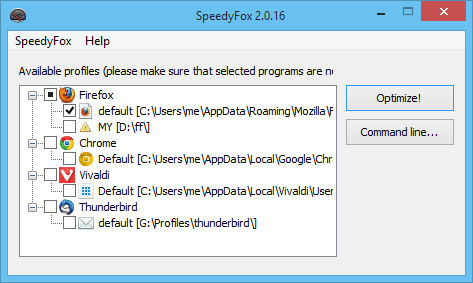
Firefox là trình duyệt đầy tốc độ, nhưng sau thời gian quá lâu có thể làm nó hoạt động chậm lạ, lý do là cơ sở dữ liệu bị phân mảnh dần. 1 công cụ miễn phí được thiết kế đặc biệt để giải quyết vấn đề trên là SpeedyFox. Phương pháp được sử dụng trong SpeedyFox đảm bảo 100% an toàn cho dữ liệu của bạn (bookmars, password, vv), nó được xem như 1 tài liệu hữu ích và đã thử nghiệm trên nhiều máy tính.


Firefox của bạn làm việc chậm?


Tăng tốc Firefox bằng một nhấp chuột duy nhất với SpeedyFox hoàn toàn miễn phí!

Bạn nhận được:


Tốc khởi động Firefox lên đến 3 lần!

Tối ưu trình duyệt.

Hoạt động nhanh hơn với cookie.

Sớm có mặt SpeedyFox cho Mac.


Trang chủ: http://www.crystalidea.com/speedyfox
Tải xuống SpeedyFox 2.0.2
http://www.mediafire.com/?pi0lkndlbimrhd3

Friday, 4 May 2012

Yahoo! Messenger 11.5.0.192 - phiên bản yahoo mới nhất hiện nay

Yahoo! Messenger 11.5.0.192 phiên bản yahoo mới nhất hiện nay


Yahoo! Messenger 11.5.0.192 - phiên bản yahoo mới nhất hiện nay


Yahoo! Messenger

It's BURSTING with FUN!

Yahoo! Messenger is a popular advertisement-supported instant messaging client and associated protocol provided by Yahoo!, that allows you to see when friends come online and to send them instant messages. It also can alert you to new e-mail in your Yahoo Mail or Yahoo Personals accounts, or when you have upcoming events recorded in your Yahoo Calendar. Yahoo Messenger offers firewall support, a standby mode that minimizes the program until an Internet connection is made, the ability to save and print your conversations, and a tabbed interface that provides quick access to your favorite stocks, news, and sports scores. Yahoo! Messenger is provided free of charge and can be downloaded and used with a generic “Yahoo! ID” which also allows access to other Yahoo! services, such as Yahoo! Mail, where users can be automatically notified when they receive new email.Yahoo! also offers PC-PC, PC-Phone and Phone-to-PC service, file transfers, webcam hosting, text messaging service, and chat rooms in various categories.

Features of Yahoo! Messenger:

Entertainment

• Photo Sharing. Drag-and-drop photos into your IM windows and talk about them like you’re there.
• LAUNCHcast Radio. Make your own radio station and listen to music you like!
• Yahoo! Games. Right in your IM window, challenge friends to a game of backgammon or pool while you catch up.
• IMVironments. Use interactive themed backgrounds in your IMs.


Productivity


• IM Windows Live™ Messenger friends. Share IMs (and more), plus see them on your Messenger List.
• Yahoo! Calendar. Stay organized and get calendar alerts.
• Contact Search Bar. Quickly find a contact to IM, call, SMS and more.
• Find, Add, Share Friends. Easily get connected with the people who matter most.
• Yahoo! Search. Find what you need right from your IM window.
• File Transfer. Share files with friends instantly.
• Address Book. Synchronize all your contact information.
• Stealth Settings. Make yourself appear online to some and offline to others.

Personalization

• Plug-ins. Add content, services and games to Messenger.
• Sound effects. Play fun sounds or a song during PC calls.
• Audibles. Let these animated characters say it out loud for you!
• Emoticons. Express your feelings with these animated smiling faces.
• Yahoo! Avatars. Represent yourself with a stylized graphical image.
• Display Images. Select an image to represent yourself to your friends.
• Skins. Select new visual designs or disable them altogether.

Communication

• Chat Rooms. Join a live, group chat room to discuss a variety of topics.
• Make Calls From Your PC. Make free worldwide PC-to-PC calls, plus free voice mail.
• PC-to-Phone Calls. Call regular and mobile phones for as low as 1¢/min.
• Phone-to-PC Calls. Get a phone number for your PC so friends can call you.
• Connect on Yahoo! 360°. Stay up to date with friends’ blogs, photos, and more.
• Take Yahoo! with You. Send and receive IMs on your mobile phone.
• Webcam. Share live video with friends and family around the world.
• Conference. Exchange text messages with multiple people in one IM.


System requirements: Microsoft Windows XP, Vista, 7.


Download Vietnamese (Offline installer)
Download English (Offline installer)


Download Ad Banner Remover Lite v1.0.0.2 x86
Download Ad Banner Remover Lite v1.0.0.2 x64

Monday, 23 April 2012

[MF] hot hot Phần mềm Crack IDM + Vào Facebook + Chat Yahoo nhiều nick All in One


[MF] hot hot Phần mềm Crack IDM + Vào Facebook + Chat Yahoo nhiều nick All in One
[MF] hot hot Phần mềm Crack IDM + Vào Facebook + Chat Yahoo nhiều nick All in One
[MF] hot hot Phần mềm Crack IDM + Vào Facebook + Chat Yahoo nhiều nick All in One
Yêu cầu: DotNet 2.0
P/s: Vừa Fix lại link + fix lỗi, các bạn tải link Dropbox dưới nhé!

Update[1:37 PM] : Các bạn tải lại link để lấy Version mới nhất nhé,

CÁC ĐỒNG CHÍ NHỚ NHẤN VÀO HƯỚNG DẪN TRƯỚC KHI SỬ DỤNG ĐỂ TRÁNH KÊU CA LỖI NHÉ
LINKDOWNLOAD:
pass giai nen: vnnclub.com

Friday, 20 April 2012

MailWasher Pro 2012 v1.11.0 Portable


MailWasher Pro 2012 v1.11.0 Portable
MailWasher gives you the easiest way to
remove spam before it gets to your computer.

MailWasher has deservedly earned its reputation as one of the worlds top anti-apam products. With over 8 million users around the world and features on both BBC and CNN you can be confident that it is one of the easiest ways to get rid of spam.

Get your free download today and become spam free with MailWasher.

Now in 18 languages! English, German, French, Spanish, Polish, Dutch, Hungarian, Bulgarian, Ukranian, Swedish, Russian, Czech, Norwegian, Armenian, Croatian, Danish, Japanese, Portuguese and Pirate!.


Spam can't get to your inbox
Remove spam from its source before it even reaches your computer. You'll Never suffer from spam in your inbox again.

Unbeatable spam detection tools
Advanced spam detection technology and tools do all the hard work for you by automatically marking spam emails and flagging them for deletion.

Preview all incoming mail before downloading it

Instantly preview all incoming email and decide what do do before it even reaches your computer. No more time wasted downloading annoying emails with huge attachments.

No brainer setup, quick and easy to use
So easy to setup and use. Automatically pull down all your mail settings and contact information so you can start blocking spam like a pro in no time.

Version 2012 1.11
Released 16 March 2012
Added ability to Import and Export settings, found under File menu
Allow AutoDelete to be set to lower values
Added basic AntiVirus disabling recommendation on certain errors
Updated Language Files
Fix for Contact Import on Outlook 64bit
Fix for High Contrast displays
Minor UI tweaks not even worth mentioning

Size: 10.4 MB

Made By XenoCode


Wednesday, 4 April 2012

Google Chrome v18.0.1025.142 Portable


Google Chrome is a browser that combines a minimal design with sophisticated technology to make the web faster, safer, and easier. It has one box for everything: Type in the address bar and get suggestions for both search and web pages. Will give you thumbnails of your top sites; Access your favorite pages instantly with lightning speed from any new tab. Google Chrome is an open source web browser developed by Google. Its software architecture was engineered from scratch (using components from other open source software including WebKit and Mozilla Firefox) to cater for the changing needs of users and acknowledging that today most web sites aren't web pages but web applications. Design goals include stability, speed, security and a clean, simple and efficient user interface.


Security
• Sandboxing
Every tab in Chrome is sandboxed, so that a tab can display contents of a web page and accept user input, but it will not be able to read the user's desktop or personal files. Google say they have "taken the existing process boundary- and made it into a jail". There is an exception to this rule; browser plugins such as Adobe Flash Player do not run within the boundaries of the tab jail, and so users will still be vulnerable to cross-browser exploits based on plugins, until plugins have been updated to work with the new Chrome security. Google has also developed a new phishing blacklist, which will be built into Chrome, as well as made available via a separate public API.
• Privacy
Google announces a so-called incognito mode claiming that it "lets you browse the web in complete privacy because it doesn’t record any of your activity". No features of this, and no implications of the default mode with respect to Google's database are given.
• Speed
Speed improvements are a primary design goal.

Stability
• Multiprocessing
The Gears team were considering a multithreaded browser (noting that a problem with existing web browser implementations was that they are inherently single-threaded) and Chrome implemented this concept with a multiprocessing architecture. A separate process is allocated to each task (eg tabs, plugins), as is the case with modern operating systems. This prevents tasks from interfering with each other which is good for both security and stability; an attacker successfully gaining access to one application does not give them access to all and failure in one application results in a "Sad Tab" screen of death. This strategy exacts a fixed per-process cost up front but results in less memory bloat overall as fragmentation is confined to each process and no longer results in further memory allocations. To complement this, Chrome will also feature a process manager which will allow the user to see how much memory and CPU each tab is using, as well as kill unresponsive tabs.

User interface
• Features
Chrome has added some commonly used plugin-specific features of other browsers into the default package, such as an Incognito tab mode, where no logs of the user activity are stored, and all cookies from the session are discarded. As a part of Chrome's V8 JavaScript virtual machine, pop-up JavaScript windows will not be shown by default, and will instead appear as a small bar at the bottom of the interface until the user wishes to display or hide the window. Chrome will include support for web applications running alongside other local applications on the computer. Tabs can be put in a web-app mode, where the omnibar and controls will be hidden with the goal of allowing the user to use the web-app without the browser "in the way".
• Rendering Engine
Chrome uses the WebKit rendering engine on advice from the Gears team because it is simple, memory efficient, useful on embedded devices and easy to learn for new developers.
• Tabs
While all of the major tabbed web browsers (e.g. Internet Explorer, Firefox) have been designed with the window as the primary container, Chrome will put tabs first (similar to Opera). The most immediate way this will show is in the user interface: tabs will be at the top of the window, instead of below the controls, as in the other major tabbed browsers. In Chrome, each tab will be an individual process, and each will have its own browser controls and address bar (dubbed omnibox), a design that adds stability to the browser. If one tab fails only one process dies; the browser can still be used as normal with the exception of the dead tab. Chrome will also implement a New Tab Page which shows the nine most visited pages in thumbnails, along with the most searched on sites, most recently bookmarked sites, and most recently closed tabs, upon opening a new tab, similar to Opera's "Speed Dial" page.


Size: 38.6 MB


Made By Spoon Studio


Thursday, 22 March 2012

HTTrack Website Copier httrack v3.45-2 Portable


HTTrack is a free (GPL, libre/free software) and easy-to-use offline browser utility.

It allows you to download a World Wide Web site from the Internet to a local directory, building recursively all directories, getting HTML, images, and other files from the server to your computer. HTTrack arranges the original site's relative link-structure. Simply open a page of the "mirrored" website in your browser, and you can browse the site from link to link, as if you were viewing it online. HTTrack can also update an existing mirrored site, and resume interrupted downloads. HTTrack is fully configurable, and has an integrated help system.


WinHTTrack is the Windows 2000/XP/Vista/Seven release of HTTrack, and WebHTTrack the Linux/Unix/BSD release.

3.45-2
+ Fixed: number of simultaneous connections was often only one (Illyria, William Roeder)
+ Fixed: "Unexpected 412/416 error" leading to have broken files on disk


Size: 4.93 MB


Saturday, 17 March 2012

Mozilla FireFox v11.0 Portable


Mozilla Firefox - faster, more secure, easier to use and sporting a new look, this latest Firefox release sets a new standard for web browser innovation. Mozilla Firefox project (formerly Firebird, which was formerly Phoenix) is a redesign of Mozilla's browser component, written using the XUL user interface language and designed to be cross-platform. It is small, fast and easy to use, and offers many advantages over other web browsers, such as the tabbed browsing and the ability to block pop-up windows.

Browsing Made Easy
Awesome Bar
Get to your favorite sites quickly – even if you don’t remember the URLs. Type your term into the location bar (aka the Awesome Bar) and the autocomplete function will include possible matches from your browsing history, bookmarked sites and open tabs.


The Awesome Bar learns as you use it—over time, it adapts to your preferences and offers better-fitting matches. We’ve tweaked it to give you greater control over the results (including privacy settings) and increased performance so you find what you need even faster.

Improved Interface
We’re always looking for ways to make your browsing easier and more efficient.
Read on for our latest improvements (or watch the video):

Tabs are above the Awesome Bar to make it easier to focus on the content of the sites you visit.

Firefox Button (Windows and Linux)
All your menu items are now found in a single button for easy access.

Bookmark Button
Manage your bookmarks in a single button. Find your favorite links without getting bogged down!

Simplified Reload/Stop Button
Your Awesome Bar now features one easy button to stop loading pages or reload pages.

Home Button
The Home button has been moved to the right side of the search-field.

Tabs
Browse multiple sites at once, simply and easily. Each new site appears as a new tab
(not a new window) and can be accessed in one click.

App Tabs
Take sites you always keep open—like Web mail—off your tab bar and give them a permanent home in your browser.

Reopen Closed Tabs and Windows
If you accidentally close a tab or window, you can reopen it in one click. Just view Recently Closed Tabs or Recently Closed Windows in the History menu and select the tab or window you’d like to reopen.

Switch-to-Tab
As you’re opening a new tab or typing in the Awesome Bar, Firefox will check to see if you already have that site open. If you do, you’ll be directed to the existing tab so you don’t open a duplicate.

Smooth Scrolling
Like to have all 20 of your favorite pages open at once? An elegant new feature lets you scroll through tabs easily to see them all and access the one you want quickly.

Organize your Tabs with Panorama
Too many tabs? Reclaim your browser from tab clutter! Panorama lets you drag and drop your tabs into manageable groups that you can organize, name and arrange in a fun and visual way. To get started with Panorama, simply select the Tab Groups icon when you customize your Navigation Toolbar or right click any tab to Move to Group.

Stay in Sync
Sync seamlessly connects your desktop and mobile Firefoxes, so you can access your browsing history, passwords, bookmarks and even open tabs no matter which device you use. Access years of desktop browsing the first day you fire up your mobile, and use saved passwords from your desktop to fill out forms on your phone.

Now you can surf the Web on your desktop, get up in the middle of browsing and have your open tabs ready and waiting on your mobile, just as you left them. Your browsing will never be the same! Learn more about Sync or get Firefox on your phone.

Password Manager
Tired of trying to remember or retype your passwords every time you visit a favorite site? Firefox is here to help! You’ll be prompted with a non-intrusive option to remember passwords when you first log in—after that, Firefox will take care of the rest.

Form Complete
When you’re filling out an online form like your shipping address, Firefox will suggest information for each field based on your most common answers for similar fields in other forms. Tired of typing out the same answers over and over? You’ll be zipping through the forms in no time!

Pop-Up Blocker
Banish pop-ups (and pop-under windows) from your surfing experience once and for all. Or, find a happy medium: choose to view blocked pop-ups or create an “allow” list of sites whose pop-ups you’re okay with seeing.

Easy Search
The Web is a big place, but Firefox is ready to help you find whatever you’re looking for.

Integrated Web Search
Searching the Web is a breeze with the search box, located just to the right of your location bar. Select the search engine of your choice and enter your search terms into the box. The box width is even adjustable if you need more space.

Search Suggestions
Start typing in the search bar and it will prompt you with a drop down of filled-in suggestions. You can even use the search bar as a calculator, converter and more.

Hundreds of Search Engines
Choose from the preset dropdown list of search options or select “manage search engines” to browse for many more search-related add-ons. Check out your choices.

Smart Keywords
Search the Web in record time with smart keywords. With a few clicks you can assign keywords to search engines, and then simply enter your key and search words in the location bar. Assigning “books” to Amazon.com means you can type in a search like “books about home building” and zip right there, with no pausing on the Amazon home page.

Location-Aware Browsing
Need directions, or help finding a restaurant? Firefox can tell sites where you’re located so you can get the most relevant and useful information. The browser won’t share your location without your permission, either – your privacy is the top priority.

Session Restore
Session Restore instantly brings back your windows and tabs, restoring text you entered and any in-progress downloads. You can restart the browser without losing your place after you install an add-on or software update. And, if Firefox or your computer unexpectedly closes, you don’t have to spend time recovering data or retracing your steps through the Web. If you’re in the middle of typing an email, you’ll pick up where you left off, even down to the last word you typed.

Spell Checking
A built-in spell checker works directly in Web pages, like blog posts and email. Save yourself a step and stop worrying about typos.

Get Organized
There’s a lot of great stuff on the Web, Firefox is full of ways to help you keep track.

One-Click Bookmarking
Manage your bookmarks a lot or a little. One click on the star icon at the end of the location bar bookmarks a site. Two clicks and you can choose where to save it and whether to tag it. File bookmarked sites in easy-to-access folders and organize according to theme (like “job search” or “favorite shopping”). Find your bookmarked sites in a flash by entering the tag, page or bookmark name into the location bar. The more you use your tags and bookmark names in the location bar, the more the system will adapt to your preferences.

Tags
Label a site with names or categories that are meaningful to you. For example, you can label both www.bbc.co.uk and www.nytimes.com with the “news” tag. When you enter “news” into the location bar, both sites will be shown as results. A single site can have multiple tags, and there’s no limit to the number of tags you can create. You may not remember the exact name of a site, but with a tag, you’ll be able to find it easily.

Library
Make your browser as efficient as you can imagine. Your browsing history and your bookmarks are archived in the Library, where they can be easily searched and organized. As your bookmark list and history grow, you can save your frequent searches in automatically updated smart folders.

Search and Find
The find feature appears with a simple keystroke. Search for a word or phrase on an open Web page. Highlight text before using the feature and the finder opens pre-filled with your selection. See all instances of your search at once, or scroll backwards and forwards through any appearances of the word on the page.

RSS Feed Reader
Spending hours combing the Web for the latest news and updates? Instead, add an RSS feed icon to your toolbar and create feeds using an online web service, a client-side feed reader or by creating a Firefox Live Bookmark.

Download Manager
Download files seamlessly and securely! A pause and resume feature means you can stop and start anytime. So, if you’re halfway through downloading a big file and it’s time to catch the bus, just pause and pick up where you left off later. The resume function also works if your system crashes or is forced to restart. The manager shows your download progress and even lets you search your files by name or the Web address where the download came from.

Offline Browsing
Take your computer offline and still have your information at your fingertips. Certain sites may allow applications—like your Web-based email—to stay with you at all times.

Full Zoom
Want to see captions and pictures in a larger size? An elegant new zoom feature lets you swoop in and see the details on web pages, zeroing in on what matters. The pages will scale equally, with all the elements of layout changing at the same level.

Naturalized Look & Feel
The Firefox platform looks and feels like home. Think of it as a Firefox who’s really good at making friends. Whether you use Windows 7, Mac or Linux, the browser seamlessly integrates into your computer’s environment. A native look makes for a flawless interface that never gives you pause.

Firefox Support
Need help? Our support site has a searchable knowledge base of articles, plus forums and tutorials full of solutions and tips for a better experience.

High Performance
Super Speed
With faster start-up times, rapid graphics rendering and improved page load speed, Firefox 4 is full of major performance improvements you’ll notice instantly. From integrating Compartments and more efficiently managing JavaScript objects to supporting ECMAScript5 and building the brand new J?gerMonkey JavaScript engine, we’ve been working hard under the hood to make this the most powerful Firefox ever.

Crash Protection
Firefox provides uninterrupted browsing when there is a crash in the Adobe Flash, Apple QuickTime or Microsoft Silverlight plugins. If one of these commonly-used plugins crashes or freezes, it won't affect the rest of Firefox. Instead, you can simply reload the page to restart the plugin and try again. Learn more about plugins.

Real World Performance
Having a super fast JavaScript engine is definitely important, but since those changes are often measured in milliseconds sometimes what matters even more is the way the browser feels when you’re actually using it. That’s why we’re constantly optimizing Firefox to be great for the way you use the web – things like making new tabs open up more quickly, or having the Awesome Bar provide results even faster. In the end, it’s about getting you where you need to go as quickly and easily as possible.

3D on the Web
WebGL brings 3D graphics to Firefox, opening the door for developers to create vivid games and new kinds of visualizations and experiences for the Web.

Hardware Acceleration
Experience super-fast graphics acceleration of video and Web content with a new layers-based graphics system that takes advantage of Direct2D and Direct3D on Windows and OpenGL on Mac.

Advanced Security
Instant Web Site ID
Want to be extra sure about a site’s legitimacy before you make a purchase? Click on its favicon for an instant identity overview. Another click digs deeper: how many times have you visited? Are your passwords saved? Check up on suspicious sites, avoid Web forgeries and make sure a site is what it claims to be.
Instant Web Site ID screenshot

Content Security Policy
The Content Security Policy in Firefox is designed to shut down cross-site scripting attacks by providing a mechanism for sites to explicitly tell the browser which content is legitimate. The browser can then disregard any content that has not been blessed by the site, keeping you protected in the process.

Customized Security Settings
Control the level of scrutiny you’d like Firefox to give a site. You can even enter exceptions—sites that don’t need the third degree. Customize settings for passwords, cookies, loading images, and installing add-ons for a fully empowered Web experience.

Parental Controls
Enforce parental control settings you’ve entered on Windows 7 to stop unwanted downloads and more.

Secure Updates
Firefox looks for a secure connection before installing or updating add-ons, third-party software, and Personas.

Private Browsing
Sometimes it’s nice to go undercover: turn this feature on and protect your browsing history. You can slip in and out of private browsing mode quickly, so it’s easy to go back to what you were doing before as if nothing ever happened. This feature is great if you’re doing your online banking on a shared computer or checking email from an Internet café.
Private Browsing screenshot

Anti-Virus Integration
Firefox integrates elegantly with your Windows anti-virus software. When you download a file, your computer’s anti-virus program automatically checks it to protect you against viruses and other malware, which could otherwise attack your computer.

Anti-Phishing
Shop and do business safely on the Internet. Firefox gets a fresh update of forgery sites a whopping 48 times a day, so if you try to visit a fraudulent site that’s pretending to be someone you trust (like your bank), a warning message will stop you before any harm is done.

Clear Recent History
Clear all your private data or just your activity over the past few hours with a few quick clicks. You have full control over what to delete, and then your info is gone for good—on your own computer or the one at your local library. It’s that easy.

Anti-Malware
Firefox protects you from viruses, worms, trojan horses, and spyware delivered over the Web. If you accidentally access an attack site, it will warn you away from the site and tell you why it isn’t safe to use.

Do Not Track
Many sites track your online behavior and sell that data to advertisers. If that makes you uncomfortable, Firefox lets you tell sites you want to opt out of behavioral tracking and keep your browsing habits private.

Forget This Site
Having second thoughts about having visited a certain site? Remove every trace of ever having been there!

Securing Website Connections
Firefox keeps attackers from intercepting your sensitive data by automatically establishing secure connections to websites that offer secure https servers.

Automated Updates
Firefox will automatically let you know when there’s a new version available, so you can make sure your browser is always up-to-date with the latest and greatest security fixes.

Outdated Plugin Detection
Plugins are small bits of third-party software built by companies like Adobe Systems or Apple to power videos, animation and games. They can be major security risks when they get out of date, so we’ve built an easy tool to help you stay current. Check your plugins.


Size: 26.4 MB

Note:
1- Flash Player 11.1 Included
2- Enjoy!


Wednesday, 14 March 2012

[MF] Adobe Flash Player 11.2.202.221 RC1


[MF] Adobe Flash Player 11.2.202.221 RC1
[MF] Adobe Flash Player 11.2.202.221 RC1
tai blog.vnnclub.com

Adobe Flash Player là một ứng dụng phổ biến cung cấp các trải nghiệm Adobe Flash hiệu quả thông qua các desktops và các thiết bị khác. Cho phép bạn xem các chương trình giải trí và các hình ảnh động trên web tốt nhất. Nó thể hiện các ứng dụng web ngoại vi, các giao diện sử dụng web chất lượng cao, các quảng cáo trực tuyến tương tác, và các hình ảnh động từ ngắn đến dài.

Adobe Flash Player là một ứng dụng có công năng cao, nhẹ, và có ý nghĩa mang đến cho người sử dụng những trải nghiệm mạnh mẽ và ổn định qua các hệ điều hành, các trình duyệt, điện thoại di động, và các thiết bị khác.

Adobe Flash Player cho phép bạn xem các nội dung web tương tác như game, các bài trình diễn, các quảng cáo. Bộ phần mềm này chỉ có Flash Player và nó cài đặt độc lập. Về mặt kỹ thuật, đây là một trình kiểm soát Flash Player ActiveX. Nó chỉ chạy các file qua trình duyệt web của bạn.

Được cài đặt trên 700 triệu máy tính và các thiết bị khác có kết nối internet, Flash Player cho phép các tổ chức, cá nhân thiết lập và trình bày các chương trình kỹ thuật số đến người sử dụng cuối cùng của họ.

Flash là một nền tảng phần mềm có mặt hầu hết khắp nơi trên thế giới, chiếm đến 97% các máy tính có kết nối internet cũng như các thiết bị thông dụng khác. Nhờ có thể tự do tùy chỉnh cách thể hiện các trang web truyền thống, bạn có thể sử dụng ứng dụng này để thể hiện thương hiệu của bạn và công ty một cách hiệu quả.
LINKDOWNLOAD:
pass giai nen: vnnclub.com

Saturday, 25 February 2012

Download TeamViewer 7.0.12541 Crack - Điều khiển máy tính từ xa qua Internet

Download TeamViewer 7.0.12541 Crack - Điều khiển máy tính từ xa qua Internet,


TeamViewer là một chương trình hỗ trợ truy cập và điều khiển máy từ xa thông qua mạng Internet, là giải pháp tất cả trong một:

* Giải quyết các vấn đề máy tính thông qua Internet.
* Truy cập vào máy tính của bạn mọi lúc, mọi nơi.
* Hợp tác, họp mặt và đào tào trực tuyến


Download vnnclub.com


Sunday, 19 February 2012

HTTrack Website Copier httrack v3.44-5 Portable


HTTrack is a free (GPL, libre/free software) and easy-to-use offline browser utility.

It allows you to download a World Wide Web site from the Internet to a local directory, building recursively all directories, getting HTML, images, and other files from the server to your computer. HTTrack arranges the original site's relative link-structure. Simply open a page of the "mirrored" website in your browser, and you can browse the site from link to link, as if you were viewing it online. HTTrack can also update an existing mirrored site, and resume interrupted downloads. HTTrack is fully configurable, and has an integrated help system.


WinHTTrack is the Windows 2000/XP/Vista/Seven release of HTTrack, and WebHTTrack the Linux/Unix/BSD release.

3.44-5
* Fixed: crash when using -d with non-fully-qualified hostname (Alain Desilets)
* Fixed: typo in logs (Pascal Boulerie)


Size: 4.93 MB


Friday, 17 February 2012

Mozilla FireFox v10.0.1 Portable


Mozilla Firefox - faster, more secure, easier to use and sporting a new look, this latest Firefox release sets a new standard for web browser innovation. Mozilla Firefox project (formerly Firebird, which was formerly Phoenix) is a redesign of Mozilla's browser component, written using the XUL user interface language and designed to be cross-platform. It is small, fast and easy to use, and offers many advantages over other web browsers, such as the tabbed browsing and the ability to block pop-up windows.

Browsing Made Easy
Awesome Bar
Get to your favorite sites quickly – even if you don’t remember the URLs. Type your term into the location bar (aka the Awesome Bar) and the autocomplete function will include possible matches from your browsing history, bookmarked sites and open tabs.


The Awesome Bar learns as you use it—over time, it adapts to your preferences and offers better-fitting matches. We’ve tweaked it to give you greater control over the results (including privacy settings) and increased performance so you find what you need even faster.

Improved Interface
We’re always looking for ways to make your browsing easier and more efficient.
Read on for our latest improvements (or watch the video):

Tabs are above the Awesome Bar to make it easier to focus on the content of the sites you visit.

Firefox Button (Windows and Linux)
All your menu items are now found in a single button for easy access.

Bookmark Button
Manage your bookmarks in a single button. Find your favorite links without getting bogged down!

Simplified Reload/Stop Button
Your Awesome Bar now features one easy button to stop loading pages or reload pages.

Home Button
The Home button has been moved to the right side of the search-field.

Tabs
Browse multiple sites at once, simply and easily. Each new site appears as a new tab
(not a new window) and can be accessed in one click.

App Tabs
Take sites you always keep open—like Web mail—off your tab bar and give them a permanent home in your browser.

Reopen Closed Tabs and Windows
If you accidentally close a tab or window, you can reopen it in one click. Just view Recently Closed Tabs or Recently Closed Windows in the History menu and select the tab or window you’d like to reopen.

Switch-to-Tab
As you’re opening a new tab or typing in the Awesome Bar, Firefox will check to see if you already have that site open. If you do, you’ll be directed to the existing tab so you don’t open a duplicate.

Smooth Scrolling
Like to have all 20 of your favorite pages open at once? An elegant new feature lets you scroll through tabs easily to see them all and access the one you want quickly.

Organize your Tabs with Panorama
Too many tabs? Reclaim your browser from tab clutter! Panorama lets you drag and drop your tabs into manageable groups that you can organize, name and arrange in a fun and visual way. To get started with Panorama, simply select the Tab Groups icon when you customize your Navigation Toolbar or right click any tab to Move to Group.

Stay in Sync
Sync seamlessly connects your desktop and mobile Firefoxes, so you can access your browsing history, passwords, bookmarks and even open tabs no matter which device you use. Access years of desktop browsing the first day you fire up your mobile, and use saved passwords from your desktop to fill out forms on your phone.

Now you can surf the Web on your desktop, get up in the middle of browsing and have your open tabs ready and waiting on your mobile, just as you left them. Your browsing will never be the same! Learn more about Sync or get Firefox on your phone.

Password Manager
Tired of trying to remember or retype your passwords every time you visit a favorite site? Firefox is here to help! You’ll be prompted with a non-intrusive option to remember passwords when you first log in—after that, Firefox will take care of the rest.

Form Complete
When you’re filling out an online form like your shipping address, Firefox will suggest information for each field based on your most common answers for similar fields in other forms. Tired of typing out the same answers over and over? You’ll be zipping through the forms in no time!

Pop-Up Blocker
Banish pop-ups (and pop-under windows) from your surfing experience once and for all. Or, find a happy medium: choose to view blocked pop-ups or create an “allow” list of sites whose pop-ups you’re okay with seeing.

Easy Search
The Web is a big place, but Firefox is ready to help you find whatever you’re looking for.

Integrated Web Search
Searching the Web is a breeze with the search box, located just to the right of your location bar. Select the search engine of your choice and enter your search terms into the box. The box width is even adjustable if you need more space.

Search Suggestions
Start typing in the search bar and it will prompt you with a drop down of filled-in suggestions. You can even use the search bar as a calculator, converter and more.

Hundreds of Search Engines
Choose from the preset dropdown list of search options or select “manage search engines” to browse for many more search-related add-ons. Check out your choices.

Smart Keywords
Search the Web in record time with smart keywords. With a few clicks you can assign keywords to search engines, and then simply enter your key and search words in the location bar. Assigning “books” to Amazon.com means you can type in a search like “books about home building” and zip right there, with no pausing on the Amazon home page.

Location-Aware Browsing
Need directions, or help finding a restaurant? Firefox can tell sites where you’re located so you can get the most relevant and useful information. The browser won’t share your location without your permission, either – your privacy is the top priority.

Session Restore
Session Restore instantly brings back your windows and tabs, restoring text you entered and any in-progress downloads. You can restart the browser without losing your place after you install an add-on or software update. And, if Firefox or your computer unexpectedly closes, you don’t have to spend time recovering data or retracing your steps through the Web. If you’re in the middle of typing an email, you’ll pick up where you left off, even down to the last word you typed.

Spell Checking
A built-in spell checker works directly in Web pages, like blog posts and email. Save yourself a step and stop worrying about typos.

Get Organized
There’s a lot of great stuff on the Web, Firefox is full of ways to help you keep track.

One-Click Bookmarking
Manage your bookmarks a lot or a little. One click on the star icon at the end of the location bar bookmarks a site. Two clicks and you can choose where to save it and whether to tag it. File bookmarked sites in easy-to-access folders and organize according to theme (like “job search” or “favorite shopping”). Find your bookmarked sites in a flash by entering the tag, page or bookmark name into the location bar. The more you use your tags and bookmark names in the location bar, the more the system will adapt to your preferences.

Tags
Label a site with names or categories that are meaningful to you. For example, you can label both www.bbc.co.uk and www.nytimes.com with the “news” tag. When you enter “news” into the location bar, both sites will be shown as results. A single site can have multiple tags, and there’s no limit to the number of tags you can create. You may not remember the exact name of a site, but with a tag, you’ll be able to find it easily.

Library
Make your browser as efficient as you can imagine. Your browsing history and your bookmarks are archived in the Library, where they can be easily searched and organized. As your bookmark list and history grow, you can save your frequent searches in automatically updated smart folders.

Search and Find
The find feature appears with a simple keystroke. Search for a word or phrase on an open Web page. Highlight text before using the feature and the finder opens pre-filled with your selection. See all instances of your search at once, or scroll backwards and forwards through any appearances of the word on the page.

RSS Feed Reader
Spending hours combing the Web for the latest news and updates? Instead, add an RSS feed icon to your toolbar and create feeds using an online web service, a client-side feed reader or by creating a Firefox Live Bookmark.

Download Manager
Download files seamlessly and securely! A pause and resume feature means you can stop and start anytime. So, if you’re halfway through downloading a big file and it’s time to catch the bus, just pause and pick up where you left off later. The resume function also works if your system crashes or is forced to restart. The manager shows your download progress and even lets you search your files by name or the Web address where the download came from.

Offline Browsing
Take your computer offline and still have your information at your fingertips. Certain sites may allow applications—like your Web-based email—to stay with you at all times.

Full Zoom
Want to see captions and pictures in a larger size? An elegant new zoom feature lets you swoop in and see the details on web pages, zeroing in on what matters. The pages will scale equally, with all the elements of layout changing at the same level.

Naturalized Look & Feel
The Firefox platform looks and feels like home. Think of it as a Firefox who’s really good at making friends. Whether you use Windows 7, Mac or Linux, the browser seamlessly integrates into your computer’s environment. A native look makes for a flawless interface that never gives you pause.

Firefox Support
Need help? Our support site has a searchable knowledge base of articles, plus forums and tutorials full of solutions and tips for a better experience.

High Performance
Super Speed
With faster start-up times, rapid graphics rendering and improved page load speed, Firefox 4 is full of major performance improvements you’ll notice instantly. From integrating Compartments and more efficiently managing JavaScript objects to supporting ECMAScript5 and building the brand new J?gerMonkey JavaScript engine, we’ve been working hard under the hood to make this the most powerful Firefox ever.

Crash Protection
Firefox provides uninterrupted browsing when there is a crash in the Adobe Flash, Apple QuickTime or Microsoft Silverlight plugins. If one of these commonly-used plugins crashes or freezes, it won't affect the rest of Firefox. Instead, you can simply reload the page to restart the plugin and try again. Learn more about plugins.

Real World Performance
Having a super fast JavaScript engine is definitely important, but since those changes are often measured in milliseconds sometimes what matters even more is the way the browser feels when you’re actually using it. That’s why we’re constantly optimizing Firefox to be great for the way you use the web – things like making new tabs open up more quickly, or having the Awesome Bar provide results even faster. In the end, it’s about getting you where you need to go as quickly and easily as possible.

3D on the Web
WebGL brings 3D graphics to Firefox, opening the door for developers to create vivid games and new kinds of visualizations and experiences for the Web.

Hardware Acceleration
Experience super-fast graphics acceleration of video and Web content with a new layers-based graphics system that takes advantage of Direct2D and Direct3D on Windows and OpenGL on Mac.

Advanced Security
Instant Web Site ID
Want to be extra sure about a site’s legitimacy before you make a purchase? Click on its favicon for an instant identity overview. Another click digs deeper: how many times have you visited? Are your passwords saved? Check up on suspicious sites, avoid Web forgeries and make sure a site is what it claims to be.
Instant Web Site ID screenshot

Content Security Policy
The Content Security Policy in Firefox is designed to shut down cross-site scripting attacks by providing a mechanism for sites to explicitly tell the browser which content is legitimate. The browser can then disregard any content that has not been blessed by the site, keeping you protected in the process.

Customized Security Settings
Control the level of scrutiny you’d like Firefox to give a site. You can even enter exceptions—sites that don’t need the third degree. Customize settings for passwords, cookies, loading images, and installing add-ons for a fully empowered Web experience.

Parental Controls
Enforce parental control settings you’ve entered on Windows 7 to stop unwanted downloads and more.

Secure Updates
Firefox looks for a secure connection before installing or updating add-ons, third-party software, and Personas.

Private Browsing
Sometimes it’s nice to go undercover: turn this feature on and protect your browsing history. You can slip in and out of private browsing mode quickly, so it’s easy to go back to what you were doing before as if nothing ever happened. This feature is great if you’re doing your online banking on a shared computer or checking email from an Internet café.
Private Browsing screenshot

Anti-Virus Integration
Firefox integrates elegantly with your Windows anti-virus software. When you download a file, your computer’s anti-virus program automatically checks it to protect you against viruses and other malware, which could otherwise attack your computer.

Anti-Phishing
Shop and do business safely on the Internet. Firefox gets a fresh update of forgery sites a whopping 48 times a day, so if you try to visit a fraudulent site that’s pretending to be someone you trust (like your bank), a warning message will stop you before any harm is done.

Clear Recent History
Clear all your private data or just your activity over the past few hours with a few quick clicks. You have full control over what to delete, and then your info is gone for good—on your own computer or the one at your local library. It’s that easy.

Anti-Malware
Firefox protects you from viruses, worms, trojan horses, and spyware delivered over the Web. If you accidentally access an attack site, it will warn you away from the site and tell you why it isn’t safe to use.

Do Not Track
Many sites track your online behavior and sell that data to advertisers. If that makes you uncomfortable, Firefox lets you tell sites you want to opt out of behavioral tracking and keep your browsing habits private.

Forget This Site
Having second thoughts about having visited a certain site? Remove every trace of ever having been there!

Securing Website Connections
Firefox keeps attackers from intercepting your sensitive data by automatically establishing secure connections to websites that offer secure https servers.

Automated Updates
Firefox will automatically let you know when there’s a new version available, so you can make sure your browser is always up-to-date with the latest and greatest security fixes.

Outdated Plugin Detection
Plugins are small bits of third-party software built by companies like Adobe Systems or Apple to power videos, animation and games. They can be major security risks when they get out of date, so we’ve built an easy tool to help you stay current. Check your plugins.


Size: 26.2 MB

Note:
1- Flash Player 11.1 Included
2- Enjoy!


Wednesday, 15 February 2012

Agama Web Menus v2.20 Portable


MP Software Agama Web Menus Pro is an advanced and highly effective tool that will enable you to create perfect and fully functional DHTML menus (web menu) compatible with all commonly used browsers without being obliged to write even a single code line. Our software will make it possible even for a complete beginner to create professionally looking DHTML menus during several minutes only. Professional developers will praise highly more than a hundred attributes that bring absolute adaptability of menus up to the level of individual menu items. You need add only short HTML menu code to your web pages, of course with using your favorite sitebuilder like Homesite, Expression Web, Dreamweaver and others.


Agama Web Menus application contains hundreds of predefined menu templates in the styles of XP menu, Vista menu, Mac and many other styles of a high graphic quality. On the other hand you will be able to create and save hundreds of other, your own, personalized, original and repeatedly applicable menu styles. Agama Web Menus contains a sitemap generator for creating a Google sitemap and also a tool for creating any fully user-adaptable sitemaps. Unlike most of competitive tools, Agama Web Menus brings you a really complex solution for web navigation. You can create not only traditional Popup menus, Dropdown menus, Navigation bars, Buttons menu or Bookmark menus with our program but also Tree menus or Dropdown tree menus. All of this is offered for the price of one single program!

You will be able to create many kinds of menus with a single tool:
• Popup menu
• Dropdown popup menu
• Horizontal navigation bar menu
• Tree menu
• Dropdown tree menu

Professional features:
- Fully cross-browser support
- Tree menus
- Drop down tree menus
- Popup menus
- Drop down popup menus
- Horizontal navbars
- Unlimited menus in the page
- Unlimited submenus and Items
- Unlimited submenu levels
- All doc types support
- Fully adaptability of menus up to the level of individual menu items
- Include more then hundred menu themes
- Menu structure drag-and-drop design function
- Menu structure copy and paste design function
- Menus/submenus positionning and resizing (WYSIWYG design style)
- Special conntent e.g. Login form, Search form, Clock, Calendar and other
- Fully user-adaptable sitemaps generator
- Google site map generator
- Creating own menu themes
- Menu drifting
- Custom programmble event trigers
- Separate sets of engine and configuration javascript files (server side menu generation support)
- Non opfuscated javascript code (full source code)
- Incorporating Into CD/DVD-ROM web based application


Size: 6.27 MB


Thursday, 9 February 2012

Ashampoo ClipFinder HD v2.25 Portable


Find, view, save and convert web videos in HD or SD.
The brand-new Ashampoo ClipFinder HD gives you web video the way it should be. Search in up to fifteen video portals at once or in selected portals, view videos directly and convert and save them to your hard disk with a single click.

Nothing makes finding, viewing, saving and managing web videos easier. And Ashampoo ClipFinder HD isn’t just better, it’s also still completely free. CNET’s reviewers called the original ClipFinder “a breath of fresh air” among programs of this type and the new ClipFinder HD is even better and more powerful.

How it works
ClipFinder HD is a like a 3D web browser. You just enter search words in the Search bar and the search results from up to 15 video portals are displayed as clip thumbnails in the 3D Video Wall. You can search selectively in just some portals, just one portal or all portals. You choose. You can also create multiple searches in different tabs and switch between the results.

Click on a clip to play it, click again to save it to your hard disk and convert it while your saving. Zoom the video while you’re playing by turning the mouse wheel, another click plays in full screen mode with popup controls.

Navigating in the 3D Video Wall is amazing: Zoom in on clip previews with the mouse wheel, drag to scroll up and down and from side to side, point to a clip to see information, change the order and layout by dragging. In the 3D Video Wall interface it’s like walking around in your own boutique full of videos. Users who prefer the classic scrolling interface can activate it if they want, of course.

Organizing your saved clips is just as easy. Just define categories, put your clips in them and navigate them in the 3D Video Wall and organize them by dragging with the mouse.

Great new functions
Revolutionary 3D Video Wall
Makes navigating through your search results and clip collections amazingly easy. Browse, scroll, zoom, choose and play your clips in a 3D world with natural mouse movements and the scroll wheel. Organize your Video Wall by dragging, display clip details with the mouse.
One-click download and convert
ClipFinder HD downloads the clips in flash (*.flv) format and if needed converts them directly to MP3 format in one easy process.
HD clips and HD filtering
Search for all video clips or just HD clips. Viewing, saving and converting HD clips is just as easy as regular clips.
Much more meta data
All the information you need about every clip: HD or SD, duration, rating, date, description, tags and more.
Vimeo portal support
In addition to the 14 existing portals ClipFinder HD now also supports the popular Vimeo portal with lots of HD clips. You can now search for and display clips from YouTube, Vimeo, Spike, Veoh, Google Video, LiveVideo, Dailymotion, blip.tv, Yahoo! Video, Metacafe, MySpace, SevenLoad, MyVideo, videu and ClipFish.
Better playlists
Create video clip playlists in the same way you make music playlists. The new Enqueue to Playlist function adds new clips to the current playlist on the fly without having to play them first. Playlists are shareable in the Standard M3U format and compatible with other media players.
Cool new player with full screen mode
Modern video player for regular and HD videos with super-intuitive controls. In full-screen mode you get popup controls that display when you mouse over them.
Other Cool Features
Tabbed searching
Just click the + button or press Ctrl+T to create a new search tab, which works like a browser tab. Keep separate searches in each tab and switch between them.
Unique continuous play function
Set your search results, clip collection or playlists to play continuously. No other web video utility can do this.

Great features
* Still completely free
* Amazing 3D Video Wall clip browser
* 1-click download and convert
* Vimeo portal added (lots of HD clips)
* Search up to 15 video portals at once
* Search in selected video portals
* HD video filter – find only HD videos
* New video player with full-screen mode
* Improved video playlists
* Tabbed searching, like tabbed browsing


Size: 14.9 MB

Note:
1- Flash Player 11.1 Included
2- Enjoy!


Thursday, 26 January 2012

Internet Download Manager v6.08 Build 8 Portable


Internet Download Manager has a smart download logic accelerator that features intelligent dynamic file segmentation and safe multipart downloading technology to accelerate your downloads. Unlike other download accelerators and managers that segment files before downloading starts, Internet Download Manager segments downloaded files dynamically during download process. Internet Download Manager reuses available connections without additional connect and login stages to achieve better acceleration performance.
Internet Download Manager supports proxy servers, ftp and http protocols, firewalls, redirects, cookies, authorization, MP3 audio and MPEG video content processing. IDM integrates seamlessly into Microsoft Internet Explorer, Netscape, MSN Explorer, AOL, Opera, Mozilla, Mozilla Firefox, Mozilla Firebird, Avant Browser, MyIE2, and all other popular browsers to automatically handle your downloads. You can also drag and drop files, or use Internet Download Manager from command line. Internet Download Manager can dial your modem at the set time, download the files you want, then hang up or even shut down your computer when it's done.


Other features include multilingual support, zip preview, download categories, scheduler pro, sounds on different events, HTTPS support, queue processor, html help and tutorial, enhanced virus protection on download completion, progressive downloading with quotas (useful for connections that use some kind of fair access policy or FAP like Direcway, Direct PC, Hughes, etc.), built-in download accelerator, and many others.

Main Features:
• All popular browsers and applications are supported! Internet Download Manager has been tested with the following browsers: Internet Explorer, MSN Explorer, AOL, Netscape Communicator, Netscape 6, Netscape 7, Mozilla, Mozilla Firefox, Mozilla Firebird, Opera, NetCaptor, UltraBrowser, Slim Browser, Avant Browser, MyIE2, Optimal Desktop, Ace Explorer, Advanced Browser, 27 Tools-in-1 Wichio Browser, WindowSurfer, 550 Access Browser, FineBrowser Freeware, Kopassa Browser, Fast Browser Pro, Enigma Browser, GoSuRF, K-Meleon, Smart Explorer, The Off By One Web Browser, Smartalec Voyager, CrystalPort AppCapture, The Family Browser, XANA Web Browser, Bluto, AutoSurf, 32bit Web Browser, BrowseMan, WrestlingBrowser, Eminem Browser, UltraBrowser, Cygsoft LDAP Browser, and Net M@nager. Internet Download Manager supports all versions of popular browsers, and can be integrated into any 3rd party Internet applications.
• Easy downloading with one click. When you click on a download link in a browser, IDM will take over the download and accelerate it. IDM supports HTTP, FTP, HTTPS and MMS protocols.
• Download Speed Acceleration. Internet Download Manager can accelerate downloads by up to 5 times due to its intelligent dynamic file segmentation technology. Unlike other download managers and accelerators Internet Download Manager segments downloaded files dynamically during download process and reuses available connections without additional connect and login stages to achieve best acceleration performance.
• Download Resume. Internet Download Manager will resume unfinished download from the place where they left off.
• YouTube grabber. Internet Download Manager can grab FLV videos from popular sites like YouTube, MySpaceTV, and Google Video.
• Simple installation wizard. Quick and easy installation program will make necessary settings for you, and check your connection at the end to ensure trouble free installation of Internet Download Manager
• Drag and Drop. You may simply drag and drop links to IDM, and drag and drop downloaded files out of Internet Download Manager.
• Automatic Antivirus checking. Antivirus checking makes your downloads free from viruses and trojans.
• Advanced Browser Integration. When enabled, the feature can be used to catch any download from any application. None of download managers have this feature.
• Built-in Scheduler. Internet Download Manager can connect to the Internet at a set time, download the files you want, disconnect, or shut down your computer when it's done.
• IDM includes web site spider and grabber. IDM downloads all required files that are specified with filters from web sites, for example all pictures from a web site, or subsets of web sites, or complete web sites for offline browsing. It's possible to schedule multiple grabber projects to run them once at a specified time, stop them at a specified time, or run periodically to synchronize changes.
• IDM supports many types of proxy servers. For example, IDM works with Microsoft ISA, and FTP proxy servers.
• IDM supports main authentication protocols: Basic, Negotiate, NTLM, and Keberos. Thus IDM can access many Internet and proxy servers using login name and password.
• Download All feature. IDM can add all downloads linked to the current page. It's easy to download multiple files with this feature.
• Customizable Interface. You may choose the order, and what buttons and columns appear on the main IDM window.
• Download Categories. Internet Download Manager can be used to organize downloads automatically using defined download categories.
• Quick Update Feature. Quick update may check for new versions of IDM and update IDM once per week.
• Download limits. Progressive downloading with quotas feature. The feature is useful for connections that use some kind of fair access policy (or FAP) like Direcway, Direct PC, Hughes, etc.
• IDM is multilingual. IDM is translated to Albanian, Arabic, Azerbaijan, Bosnian, Bulgarian, Chinese, Croatian, Czech, Danish, Dutch, Farsi, French, German, Greek, Hebrew, Hungarian, Italian, Japanese, Korean, Lithuanian, Macedonian, Norwegian, Polish, Portuguese, Romanian, Russian, Serbian, Slovak, Slovenian, Spanish, Thai, Turkish, and Uzbek languages.

What's new in version 6.08 build 8?
(Released: Jan 17, 2012)
Redesigned video stream recognition for web players. Added support for new types of video streaming sites
Added support for Filesonic changes
Fixed bugs


Size: 10.5 MB

Note:
1- Internet Explorer Included
2- Flash Player 11.1 Included
3- Run Internet Download Manager First Then Use Internet Explorer That Included To Download
4- Enjoy!


Monday, 23 January 2012

Ashampoo ClipFinder HD v2.24 Portable


Find, view, save and convert web videos in HD or SD.
The brand-new Ashampoo ClipFinder HD gives you web video the way it should be. Search in up to fifteen video portals at once or in selected portals, view videos directly and convert and save them to your hard disk with a single click.

Nothing makes finding, viewing, saving and managing web videos easier. And Ashampoo ClipFinder HD isn’t just better, it’s also still completely free. CNET’s reviewers called the original ClipFinder “a breath of fresh air” among programs of this type and the new ClipFinder HD is even better and more powerful.

How it works
ClipFinder HD is a like a 3D web browser. You just enter search words in the Search bar and the search results from up to 15 video portals are displayed as clip thumbnails in the 3D Video Wall. You can search selectively in just some portals, just one portal or all portals. You choose. You can also create multiple searches in different tabs and switch between the results.

Click on a clip to play it, click again to save it to your hard disk and convert it while your saving. Zoom the video while you’re playing by turning the mouse wheel, another click plays in full screen mode with popup controls.

Navigating in the 3D Video Wall is amazing: Zoom in on clip previews with the mouse wheel, drag to scroll up and down and from side to side, point to a clip to see information, change the order and layout by dragging. In the 3D Video Wall interface it’s like walking around in your own boutique full of videos. Users who prefer the classic scrolling interface can activate it if they want, of course.

Organizing your saved clips is just as easy. Just define categories, put your clips in them and navigate them in the 3D Video Wall and organize them by dragging with the mouse.

Great new functions
Revolutionary 3D Video Wall
Makes navigating through your search results and clip collections amazingly easy. Browse, scroll, zoom, choose and play your clips in a 3D world with natural mouse movements and the scroll wheel. Organize your Video Wall by dragging, display clip details with the mouse.
One-click download and convert
ClipFinder HD downloads the clips in flash (*.flv) format and if needed converts them directly to MP3 format in one easy process.
HD clips and HD filtering
Search for all video clips or just HD clips. Viewing, saving and converting HD clips is just as easy as regular clips.
Much more meta data
All the information you need about every clip: HD or SD, duration, rating, date, description, tags and more.
Vimeo portal support
In addition to the 14 existing portals ClipFinder HD now also supports the popular Vimeo portal with lots of HD clips. You can now search for and display clips from YouTube, Vimeo, Spike, Veoh, Google Video, LiveVideo, Dailymotion, blip.tv, Yahoo! Video, Metacafe, MySpace, SevenLoad, MyVideo, videu and ClipFish.
Better playlists
Create video clip playlists in the same way you make music playlists. The new Enqueue to Playlist function adds new clips to the current playlist on the fly without having to play them first. Playlists are shareable in the Standard M3U format and compatible with other media players.
Cool new player with full screen mode
Modern video player for regular and HD videos with super-intuitive controls. In full-screen mode you get popup controls that display when you mouse over them.
Other Cool Features
Tabbed searching
Just click the + button or press Ctrl+T to create a new search tab, which works like a browser tab. Keep separate searches in each tab and switch between them.
Unique continuous play function
Set your search results, clip collection or playlists to play continuously. No other web video utility can do this.

Great features
* Still completely free
* Amazing 3D Video Wall clip browser
* 1-click download and convert
* Vimeo portal added (lots of HD clips)
* Search up to 15 video portals at once
* Search in selected video portals
* HD video filter – find only HD videos
* New video player with full-screen mode
* Improved video playlists
* Tabbed searching, like tabbed browsing


Size: 14.7 MB

Note:
1- Flash Player 11.1 Included
2- Enjoy!


Saturday, 14 January 2012

Flash Player Pro v5.0 Portable


Flash Player Pro is a handy flash tool kit designed as Adobe flash player and manager . It has several powerful flash tools: download flash movies from the Internet, preview and browse flash movie, capture flash image and set it as wallpaper, create flash screensaver with ease, make conversion between SWF and EXE flash movies etc. All of these features will help you enhance and extend the using possibility of existing flash files. And with friendly user interface, Flash Player Pro offers you a fantastic animated flash world!


With Flash Player Pro you can:
Download flash movies from the Internet
Browse Adobe flash movies with built-in swf player.
View or play flash movies with built-in player.
View or play movies in full screen model.
Make flash screensaver with a few mouse-click.
Make flash screensaver installer and distribute it with ease.
Capture flash movie image and save it.
Capture flash movie image and set wallpaper.
Build your own favorite folder, and browse flash movies in it.
Make conversion between SWF and EXE flash movies.
Copy or move flash movies to another folder.
Rename flash movies.
Connect with .swf file extension

January 10th, 2012 Flash Player Pro Version 5.0 released
Fix a bug in flash screensaver maker
Some minor tweaks


Size: 11.1 MB


Friday, 13 January 2012

Gmail Notifier Pro v3.6 Portable


Gmail Notifier Pro is a Windows application capable of checking multiple Gmail accounts for new mail and display notifications.

Feature highlights
Professional Gmail Notifier
Check multiple Gmail accounts, including Google Apps, for new mail.
Supports both Atom and IMAP protocols for mail.

Themes
Supports customizable themes and individual account settings, making Gmail Notifier Pro the best looking Gmail notifier on the web!


Mail Features
Read, write, reply, preview and save attachments, mark as read and delete mail without the web browser. Supports Google Contacts.

Google Calendar
Integration with Google Calendar accounts gives reminders for calendar events.

Google News, Google Reader & RSS
Get news notifications from Google News & Google Reader.
Supports RSS/Atom feeds to get notifications from any news source.

Customization
Gmail Notifier Pro provides many easy-to-use features and settings.
Define schedules when to check for mail and display notifications.

Portability
In addition to the installation package, Gmail Notifier Pro can also
run from a USB-stick without any installation.

Automatic Updates
Gmail Notifier Pro supports automatic updates. A new version can be downloaded and installed with a single click.

Security
Secure account management and encrypted connections (HTTPS / SSL) are used. 100% FREE from virus, spyware and adware.

Summary
Gmail Notifier Pro is simply the best Gmail notifier for Windows.
Supports 32-bit & 64-bit Windows XP, Windows Vista & Windows 7.


Size: 5.52 MB


Monday, 9 January 2012

SopCast v3.4.8 Portable


Terms of Service
Nowadays, all the services on SopCast (sopcast.com) are totally free and only for test purpose. Our client (P2P TV Player) and channel list can be copied and distributed freely for anyone. Any portion of these may not be sold, resold, or otherwise exploited for any commercial purpose that is not expressly permitted by SopCast. Some websites have been found selling the services based on SopCast. Please immediately cease all such infringements.
Update News

What does SopCast Provide?
* State-of-the-art P2P tech
* Minimal delay

* Fast buffering
* Firewall and NAT traversal
* Low memory and CPU load
* Play with external player
* Memory buffering
* Self-help management
* End-to-End security
* Record p2p stream

SopCast 3.4.8 new
Fixed a bug that will crash client when playing H.264 channels.

Size: 6.43 MB


Saturday, 24 December 2011

Linkman Pro v8.32 Portable


Linkman is a complete bookmark management solution to store, organize, annotate and check your favorite Internet pages. Linkman efficiently handles up to millions of URLs by using a database to store your links. It can call upon many powerful facilities that replace the browser's native URL management systems. You can easily add links from all browser windows and let retrieve keywords and descriptions automatically. The user interface is highly customizable. You get the capability to import and synchronize from existing bookmark collections and export bookmarks in a variety of formats. You can even build your own Export Templates. Several Template examples like XML and HTML output are included. Linkman supports multiple versions of ten different Windows browsers.


Features:
» Compatibility with all major Windows browsers (IE, Firefox, Opera, Chrome, Seamonkey, Maxthon, etc.)
» Use the same link collection across different browsers
» Supports keywords, ratings, comments, descriptions and user defined data
» Ability to handle large databases (even millions of links) without performance or stability issues
» Internet Explorer integration
» Firefox 3 integration
» Optional Desktop Toolbar for fastest browsing ever
» Optional Internet Explorer Toolbar
» Highly customizable user interface
» Detects duplicate links, even if they differ in subdomains, ports or login data
» Query for URLs on the same domain or subdomain and display results in groups
» User defined rating system
» Synchronization
» Extensive help file including Tutorial
» Retrieves keywords, descriptions from web pages
» Password protection
» Multiple import and export formats
» Fully customizable Html Link webpage generation
» Text and Status Query
» Printing support
» Sort feature with multiple sort orders and autosort
» Drop Basket for faster browsing and URL addition
» URL Path associated launch
» URL Launch History
» Fast Links for fast access to your favorite URLs
» Daily Links feature to launch several bookmarks with one click
» Full Drag and Drop support including link drops from browser to Linkman
» Advanced Tray Icon (configurable click actions)
» User defined browser support
» Auto save
» System-wide hotkeys for easy use, even when working with another application

Features of Pro-version:
» Optional installation on USB sticks for mobile usage
» Ability to check URLs for dead links, intelligent (only major) content changes, and page movements
» Search and Replace feature (Edit menu)
» Retrieve user configuable URL meta tags (Lite version retrieves only Keywords and Description)
» Editable Export Templates (XML, TSV...) with UTF8 support
» Query results can be exported using Templates

Compatibility with all major Windows browsers:
Firefox 1.x-3.x, Internet Explorer 3.x-8.x, Google Chrome 2.x-5.x, K-Meleon 1.x, Maxthon, SeaMonkey 1.x, Opera 4.x-9x, Avant Browser, Neoplanet, Netcaptor, SlimBrowser

8.32
* Firefox 9 and 10 (Beta) compatibility including Firefox 9 and 10 Addon (works also with 3-8)
* Internet Explorer 9.0.4 support


Size: 6.07 MB